Skip to content
playing.company

Educational game maker

Make learning games that feel like a break

A quiz on world capitals with an explanation after every answer, a story with several endings to read and debate: describe the topic and grade, Claude builds the game, and your class plays through a link – no accounts, no apps to install.

Make a learning gameQuiz · Small: price of 80 credits

You see the price before anything is built. If a build fails technically, the credits reserved for it are credited back.

Examples from school and tutoring

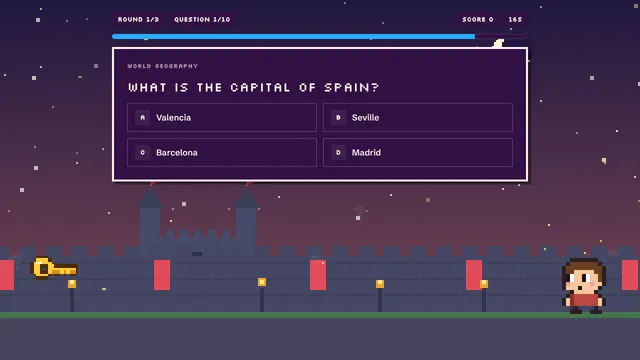
  • Screenshot: Europe Quiz

    Europe Quiz

    A learning quiz on European capitals, rivers and mountains with an explanation after every question.

    Use as a template →
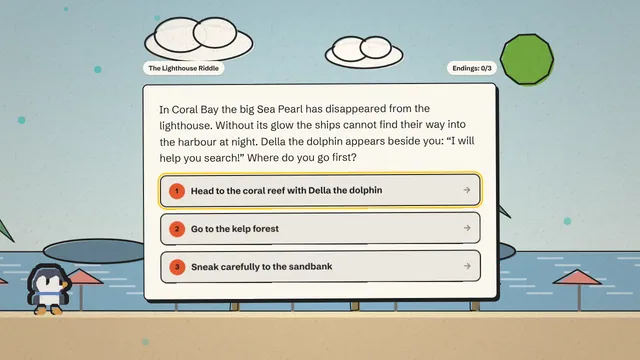
  • Screenshot: The Lighthouse Mystery

    The Lighthouse Mystery

    A story adventure with choices and several endings, great for reading and discussion.

    Use as a template →
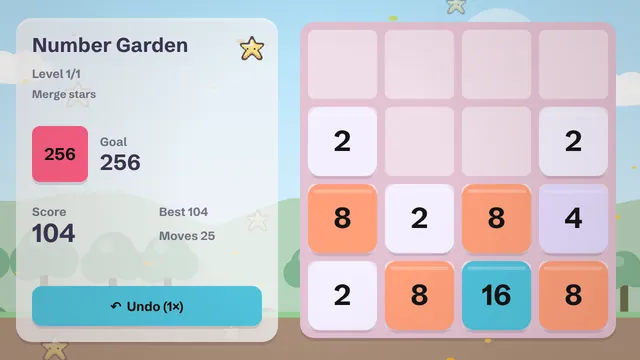
  • Screenshot: Number Garden

    Number Garden

    A number puzzle with its own theme: slide tiles, merge them, reach the target.

    Use as a template →

Why quizzes help learning

Pulling knowledge out of memory strengthens it more than reading the same material again. Psychologists call this the testing effect; a much-cited study by Roediger and Karpicke (2006) showed it clearly, and a large review by Dunlosky and colleagues (2013) rated practice testing among the most useful study techniques. A quiz game puts that to work without the pressure of an exam: the clock runs, points count, and a sentence after each question explains why the answer is right.

Two genres that work in class

  • Quiz: ideal for facts, vocabulary, technical terms and revision before tests. Every question has four options and an optional short explanation.
  • Story adventure: a tale with choices and several endings. Good for reading, ethics and civics, because every decision invites a discussion.

For breaks and cover lessons there is also the number puzzle, in which students slide and merge tiles: mental arithmetic with powers of two, without anybody calling it that.

How to describe a learning game

The idea is your brief to Claude. Four details make the difference:

  1. Grade level: “for grade 6” steers wording and difficulty.
  2. Learning goal: “be able to explain the water cycle”, not just “science”.
  3. Material: the chapters or terms that should appear.
  4. Language: games can be created in 20 languages – handy for language classes or for children who are just learning English.

Privacy in school and tutoring

Students play through a link, without an account or sign-in. We set no tracking cookies, and our usage statistics respect “Do Not Track”. Accounts are for people aged 16 and over, or 13 and over with a parent’s permission, so in practice the teacher builds the game. Do not put children’s names into questions or texts. Whether a tool may be used at your school is decided by your school or district; if you are unsure, ask your data protection officer or IT lead.

A learning game complements teaching rather than replacing it: as a starter, for revision or as homework with a fun factor. Our guide learning games in the classroom shows four lesson recipes and how to write questions that teach.

Costs: a small learning quiz is 80 credits, a story adventure of the same size 100. You do not need class sets of accounts, because only you build.

A learning game in five steps

  1. Choose quiz or story

    Quiz for facts and revision, story for reading and discussion.

  2. Choose the size

    Small, with three levels, is enough for a lesson phase of ten to fifteen minutes.

  3. Choose a style

    Paper looks calm and is easy to read; Pixel appeals to older students.

  4. Set language and extras

    The high-score extra remembers the best score on a device; touch controls help on tablets.

  5. Describe the goal, build, check

    Name grade, learning goal and terms. Play it yourself, then share the link on your class platform.

What it costs

Every game has a price in credits that you see before anything is built. This is what Quiz costs without extras:

SizeWhat you getPlay timePrice
Mini1 level2–3 min30 credits
Small3 levels + menu≈ 10 min80 credits
Medium5–8 levels, power-ups≈ 30 min200 credits
Large15+ levels, story, saving1–2 hrs560 credits

How to get credits

  • Free: 40 credits a month – enough for one mini game (30 credits), no payment details needed.
  • Starter: €9.99 a month, 300 credits – enough for about 3 games at the Small size.
  • Creator: €24.99 a month, 900 credits – enough for about 11 games at the Small size.
  • Credit packs, no subscription: 250 for €9.99, 1,000 for €34.99, 5,000 for €169, each valid for 3 years.

Prices in euros including 19% German VAT. Chat edits cost extra – you see that price up front, too. Compare all plans →

FAQ

Do students need an account?

No. They open the link in the browser and play right away, on school tablets too.

Can I see how individual students did?

No, there is deliberately no per-student report. The high-score extra stores only the best score on that device, not on our servers.

Can I use my own questions from my material?

Yes. Mention terms or sample questions in your idea and replace individual questions afterwards in the studio chat.

Is the game labeled as AI content?

Yes. Every game carries a visible AI label and machine-readable markers, as the EU AI Act requires. It is also a good occasion to talk about AI with the class.

You might also like

Ready to make your own game?

Five steps, one clear price, one link to share. It runs in the browser, on phones and computers alike.

Make a learning game
Educational Game Maker for Classrooms | playing.company